If you have been quoted for "schema implementation" and were not quite sure what you would be buying, this is the article for that.
Schema markup is a block of labelled data added to a page, describing what the page is about in a format machines read directly. It is invisible to visitors. It changes nothing about your design, your copy or your layout.
What it changes is certainty. Your page says "Open 9 to 5, closed Sunday". A machine reading that has to infer what those words refer to. The same facts in structured data say: this is an organisation, this is its opening hours property, these are the days and times. Nothing new has been claimed. The claim has simply become unambiguous.
What it actually does, and does not do
Two misconceptions cause most of the disappointment with schema.
It is not a ranking trick. Adding markup does not push a page up. It makes a page eligible for certain presentation features, and it makes the page easier to parse — which matters more every year as answers get assembled rather than listed — but there is no boost for having it.
Eligibility is not a guarantee. Correct markup makes you eligible for a rich result. Google decides whether to show one, and frequently does not. A site can have flawless markup and see nothing change in the results page, and nothing has gone wrong.
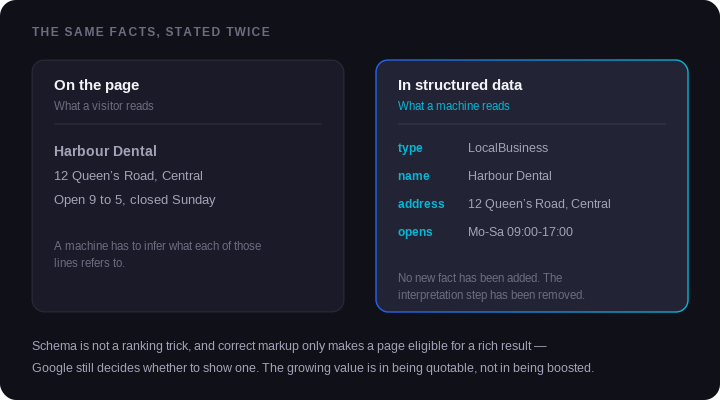
There is a third thing it does, which has become the better reason to bother. Assistants and AI answers quote sources, and they quote what they can attribute confidently. A page whose key facts are labelled is a page that is easier to cite correctly. That is an argument about attribution, not ranking, and it is the one worth making in 2026.
The six types that matter for most businesses
Schema.org defines hundreds of types. The overwhelming majority of businesses need a handful.
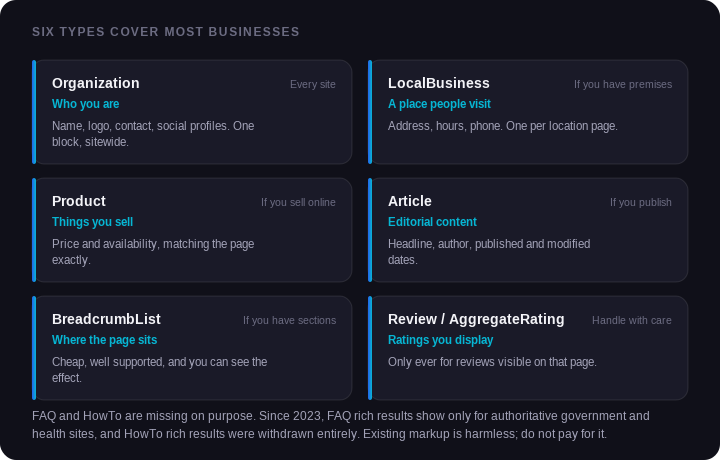
Organization — who you are. Legal name, logo, contact details, social profiles. One block, sitewide, usually in the footer or header template. This is the one every site should have and many do not.
LocalBusiness — for businesses customers physically visit. Address, opening hours, phone, geographic coordinates. If you have several locations, each location page gets its own block describing that location, not the company.
Product — for things you sell, with price and availability. This is the type most likely to produce a visible rich result, and the one most likely to generate errors when the markup and the page disagree about price.
Article — for editorial content. Headline, author, publication and modification dates. The modification date is the part worth maintaining, since it is how a refreshed page signals that it was genuinely refreshed.
BreadcrumbList — where the page sits in your site. Cheap to add, well supported, and it replaces the URL in the search result with a readable path. One of the few types whose effect you can usually see.
Review or AggregateRating — ratings, but only ones that genuinely exist on the page. This is the type with the sharpest rules and the most severe consequences for getting it wrong. More on that below.
The FAQ advice that expired in 2023
If you have read anything about schema in the last few years, you were almost certainly told to add FAQ markup. A great deal of that advice is still online, still being sold, and no longer true.
In August 2023 Google changed how it handles two popular types. On FAQ markup, its announcement said FAQ rich results "will only be shown for well-known, authoritative government and health websites". For every other site, the result stopped appearing regularly. HowTo went the same way: first restricted to desktop, then, as Google put it, "as of September 13, Google Search no longer shows How-to rich results on desktop" — which removed the feature entirely.
What this means for your site
If you have FAQ markup, you do not need to strip it out. Google was explicit that unused structured data causes no problems, and the labelling may still help a machine parse the page. What you should not do is pay for FAQ schema as a route to a rich result, or let anyone sell it to you on that basis. If a proposal leads with FAQ markup, ask when it was written.
This is a useful test for any structured data advice you are given. The field changes, old articles do not get taken down, and schema guidance ages badly. Check what Google's own search gallery currently lists before buying work based on a blog post.
How to add it without touching a template
Schema can be written three ways; only one is worth your time. JSON-LD is a self-contained block that sits in the page and references the content rather than wrapping it. Google recommends it, and because it is separate from your markup, you can add it without editing the page's HTML. The older formats, microdata and RDFa, interleave attributes through your markup and are far harder to maintain.
Through a plugin
The simplest route if you are on WordPress, Shopify or similar. The main SEO plugins generate Organization, Article and Breadcrumb markup from fields you fill in, and keep it current as content changes. For most small sites this covers everything needed, at no cost and no risk.
The one thing to watch: running two plugins that both output schema produces duplicate, conflicting blocks. If you have changed SEO plugin at any point, check that the old one is not still emitting markup.
Through a tag manager
Useful when you cannot change the site but can deploy tags. You create a custom HTML tag containing the JSON-LD and fire it on the relevant pages.
Two cautions. Markup injected this way only exists after the tag manager runs, so it depends on the page being rendered rather than read — usually fine, occasionally not. And it is easy to lose track of: schema in a tag manager is invisible to anyone looking at the site's code, so document it or the next person will conclude you have none.
Written by hand into the template
Most reliable, and the right answer for anything that has to be exactly right — product pricing, multiple locations, pages generated from a data source. It needs someone who can edit templates, which is where the work usually gets bought in.
How to validate, in two minutes
Never add markup without checking it. Two tools, and they answer different questions.
Google's Rich Results Test tells you whether your markup qualifies for a Google feature. This is the one that matters commercially: it fetches the live page, reports errors and warnings, and names which rich result you are eligible for.
The Schema Markup Validator at validator.schema.org checks your markup against the schema.org specification generally, without Google's feature requirements. Use it for types Google has no rich result for, where the Rich Results Test will simply report nothing.
Errors must be fixed — they mean the markup will not be used. Warnings mean a recommended property is missing, and are often fine to leave; the test flags optional fields the same way it flags important ones, and chasing every warning leads to padding your markup with data you do not have.
Once live, Search Console reports structured data errors per type under Enhancements, which catches the case where markup works on the page you tested and breaks on the other four hundred.
Why incorrect schema is worse than none
This is the part the subject usually skips, and the reason to be careful rather than enthusiastic.
Markup that describes something not on the page is a policy violation, not an optimisation. Marking up reviews you do not display, prices that differ from the page, or questions and answers a visitor cannot find puts you in breach of Google's structured data guidelines, and the consequence is a manual action that removes your rich results — including the legitimate ones.
Wrong-but-honest markup causes a quieter version of the same problem: a stale price or an old opening-hours block gets quoted confidently to someone deciding whether to contact you.
Asking for trouble
AggregateRating added sitewide with a 4.9 average that appears nowhere on the site, because a competitor's result had stars.
Safe and useful
AggregateRating on pages that actually display the reviews it describes, with the number and average matching what a visitor can count.
The rule is one sentence, and it resolves nearly every question in this area: only mark up what a visitor can see on that page. If you would have to explain where a figure came from, do not state it in markup.
Where to start
For most businesses, a sensible first pass is small:
- Add Organization markup sitewide. One block, your real details, in the template or via your SEO plugin.
- Add LocalBusiness to each location page if customers visit you, describing that location rather than the company.
- Add BreadcrumbList if your site has sections. It is cheap, it is well supported, and you can usually see the effect.
- Add Product to product pages if you sell online, and make price and availability come from the same source as the page, not from a figure typed in once.
- Run the Rich Results Test on one page of each template. Fix errors, read the warnings, ignore the ones that ask for data you do not have.
- Check Search Console's Enhancements reports a fortnight later, which is where you find the pages the template broke on.
That is a day of work on a typical site and it covers almost all of the available value. Everything beyond it is either specialised or, like the FAQ advice, a feature that no longer exists.
Markup written, validated and documented
Voice Search & Schema is from $250 one-time: an audit of the schema already on your site, relevant JSON-LD for your pages including organisation, article and product markup where it applies, validation before delivery, and implementation notes saying what was added and which page it belongs to. The standard fee covers up to 20 pages, delivered in three to five days. For sites generating pages from a data source, where the markup needs to be part of the template rather than added page by page, Programmatic SEO Setup is from $1,200.