Most technical SEO problems are not exotic. They are a sitemap that stopped updating eight months ago, a noindex left on a page after a redesign, and a staging site quietly competing with the live one.
None of those needs a specialist to find. They need somebody to look, on a schedule, with a list.
This is that list. Twenty-five checks in five groups, each with where to look, what counts as a pass, and what it costs you if it fails. You will need Google Search Console — which is free, and which you should have — and a browser. A crawler such as Screaming Frog makes several checks faster, and its free tier covers up to 500 URLs, which is enough for most small sites.
How to use this
Printable version
All twenty-five checks are on a two-page PDF with a tick box against each one, and space at the bottom for who ran it and when the next one is due. It is the same list as below, with the explanation stripped out.
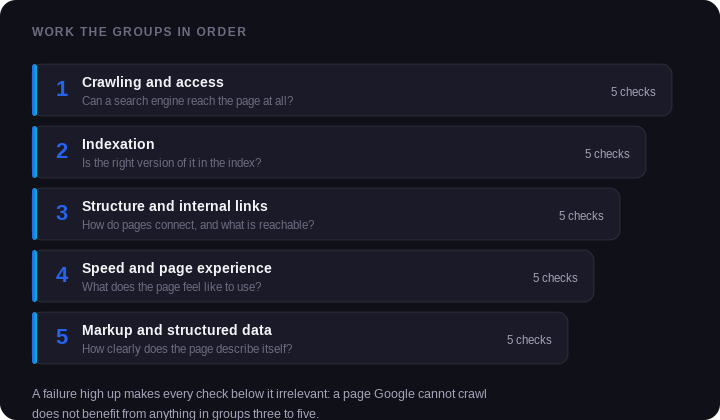
Work through the groups in order. They are sequenced deliberately: there is no point checking whether a page is fast if a robots.txt rule means Google never reaches it. Each group gets harder to fix and cheaper to ignore as you go down.
Mark each check pass, fail or not applicable. Do not fix anything while you are auditing — you will lose the thread and finish neither job. Produce the list of failures first, then work it in severity order.
The tools you need, and what they cost
Four tools cover all twenty-five checks. Three are free.
Google Search Console does most of the work here, and it is free. It is the only tool on this list that shows you what Google actually thinks about your site rather than what a third party infers, which is why ten of the checks point at it. If you do not have it verified, do that before anything else in this list; several checks are impossible without it.
Your browser's developer tools cover the script audit and the mixed-content check. Already installed, already free.
PageSpeed Insights is free and gives you both the field data Google uses and the lab diagnosis that names the LCP element.
A crawler is the one worth paying for, eventually. Screaming Frog's free tier covers 500 URLs, which is enough for most small sites and covers checks 11 to 15 and 21 to 22 in minutes rather than hours. Above that it is an annual licence. Sitebulb and Ahrefs' site audit are alternatives. You can complete this audit without one by spot-checking, but orphan pages and redirect chains are genuinely tedious to find by hand.
What you do not need: an "SEO score" tool that grades your site out of 100. Those scores aggregate real issues with cosmetic ones and present them with equal weight, which is how teams end up fixing a meta keywords warning while a staging site is indexed.
Group 1 — Crawling and access
Whether a search engine can reach your pages at all. Failures here are rare but catastrophic, which is why they go first: one bad line in a text file can remove a site from search entirely, and it is a two-minute check.
| # | Check | Where to look | Passes if | If it fails |
|---|---|---|---|---|
| 1 | robots.txt is not blocking anything you need indexed | yoursite.com/robots.txt, and Search Console’s robots.txt report | No Disallow rule covers a page you want in search | Critical |
| 2 | An XML sitemap exists, is current and is submitted | Search Console Indexing › Sitemaps | Status is Success, the date is recent, and the URL count is close to your real page count | High |
| 3 | The sitemap contains only indexable, canonical, 200-status URLs | Open the sitemap; spot-check 10 URLs | No redirects, no 404s, no noindex pages, no non-canonical variants | High |
| 4 | Crawl stats show no sudden drop or spike | Search Console Settings › Crawl stats | The trend is broadly flat; no cliff, and average response time is stable | Medium |
| 5 | Server errors are not being returned to crawlers | Crawl stats, By response | 5xx responses are a negligible share of requests | Critical |
The one that catches people
Check 1 is the most important two minutes in this list. A Disallow: / left over from a site build blocks everything, and the site keeps working perfectly for human visitors, so nobody notices until the traffic has gone.
Group 2 — Indexation
Whether the pages that can be crawled are actually in the index, and whether the right version of each one is. This group produces more real-world failures than any other.
| # | Check | Where to look | Passes if | If it fails |
|---|---|---|---|---|
| 6 | Your important pages are actually indexed | Search Console Pages report, and the URL Inspection tool | Every money page reports "URL is on Google" | Critical |
| 7 | Nothing important is excluded by noindex | Pages › Excluded by ‘noindex’ tag | The list contains only pages you deliberately excluded | Critical |
| 8 | Canonical tags point where you intend | URL Inspection, "Google-selected canonical" | Google’s chosen canonical matches yours on your main pages | High |
| 9 | No staging or development site is indexed | Search site:staging.yourdomain.com | No results | Critical |
| 10 | Duplicate pages are not competing with each other | Search Console Performance, filter by query; check which URL ranks | One URL per intent; no two of your own pages swapping positions for the same term | High |
On check 10, a specific pattern is worth knowing. If two of your own pages target the same intent, Google will usually pick one, and it may not be the one you want, and the choice can change week to week. If your Performance report shows positions oscillating for a term, look at which URL is ranking on each day before you assume it is a competitor problem.
Group 3 — Structure and internal links
How pages connect, which decides both what gets crawled often and how importance is distributed around the site. This is the group most often skipped and most often worth the time.
| # | Check | Where to look | Passes if | If it fails |
|---|---|---|---|---|
| 11 | Every important page is reachable within three clicks of the homepage | Click through it, or use a crawler’s depth report | No money page sits deeper than three levels | High |
| 12 | No orphan pages: everything is linked from somewhere | Crawler report, or compare the sitemap against crawled URLs | Every page in the sitemap has at least one internal link to it | High |
| 13 | Internal links use descriptive anchor text | Spot-check your main pages | Anchors describe the destination; almost no "click here" or bare URLs | Medium |
| 14 | Redirect chains are collapsed to a single hop | Crawler report, or follow a few known redirects | No URL redirects more than once to reach its destination | Medium |
| 15 | Internal links do not point at redirects or 404s | Crawler report, broken-link check | Internal links resolve directly with a 200 | High |
Checks 11 and 12 tend to fail together, and for the same reason: the page was published, linked from a campaign, and never given a home in the site's navigation. An orphan page can still rank, but it is being judged with none of the support the rest of your site could give it.
Group 4 — Speed and page experience
What the page feels like to use. Covered properly in the Core Web Vitals article; these are the checks that belong in a quarterly pass.
| # | Check | Where to look | Passes if | If it fails |
|---|---|---|---|---|
| 16 | Core Web Vitals pass on mobile | Search Console Experience › Core Web Vitals | LCP ≤ 2.5s, CLS ≤ 0.1, INP ≤ 200ms at the 75th percentile | High |
| 17 | The LCP element is identified and not lazy-loaded | PageSpeed Insights, which names the element | The LCP element loads eagerly and is preloaded where it is an image | High |
| 18 | Images have explicit width and height attributes | View source on a template page | Images and iframes carry dimensions, so space is reserved before they load | Medium |
| 19 | Third-party scripts have been audited this quarter | DevTools Network tab, filtered to JS; tag manager container | Every third-party domain has a named owner and a reason to be there | High |
| 20 | The site is served over HTTPS with no mixed content | Browser address bar; DevTools console warnings | No insecure-content warnings on any template | Critical |
Use the field data, not a lab score
Check 16 is deliberately pointed at Search Console rather than at a performance score out of 100. Search Console shows real-visit data at the 75th percentile over a rolling 28 days, which is what Google acts on. A lab score tells you why something is slow, not whether it matters.
Group 5 — Markup and structured data
How clearly the page describes itself. Least likely to break a site, most likely to be quietly wrong for years.
| # | Check | Where to look | Passes if | If it fails |
|---|---|---|---|---|
| 21 | Each page has one unique, descriptive title and meta description | Crawler export of titles and descriptions; Search Console | No duplicates, none empty, none truncated mid-word in the SERP preview | High |
| 22 | Exactly one H1 per page, and it describes the page | View source, or a crawler’s heading report | One H1, matching the page’s actual subject | Medium |
| 23 | Structured data validates with no errors | Google’s Rich Results Test and the Schema Markup Validator | No errors; warnings reviewed and understood | High |
| 24 | Structured data describes what is genuinely on the page | Compare the markup against the rendered page | Nothing marked up that a visitor cannot see | Critical |
| 25 | hreflang and locale targeting are correct, if you use them | Search Console International Targeting, or a crawler | Tags are reciprocal, use valid codes and resolve to live pages | Medium |
Check 24 deserves emphasis because it is where well-intentioned sites get into trouble. Structured data has to describe content a visitor can actually see on the page. Marking up reviews that are not displayed, or questions and answers that do not appear, is a policy violation rather than a technique, and the penalty for it is worse than having no markup at all.
What to fix first
You will finish with a list of failures and finite time. Order it like this.
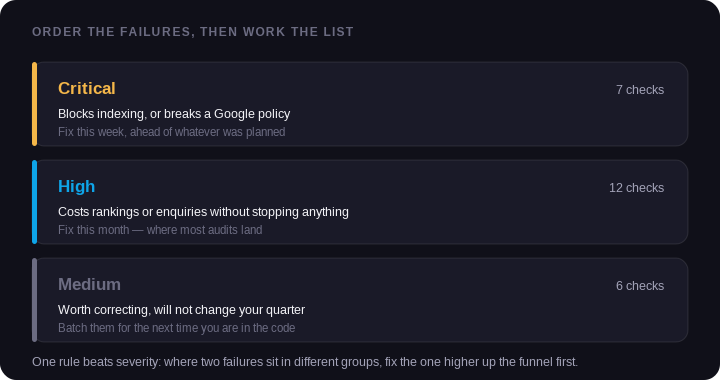
Critical failures stop pages being found, or break a Google policy. Fix them this week, ahead of whatever else was planned. There are seven of them in this list, and on most sites all seven pass.
High failures cost you rankings or enquiries without stopping anything. Fix them this month. This is where most real audits land.
Medium failures are worth correcting and will not change your quarter. Batch them and do them together when you are next in the code.
One ordering rule beats severity: if a critical failure and a high failure sit in the same group, fix the one higher up the funnel first. A canonical problem is not worth solving on a page that a robots.txt rule is blocking.
What this checklist deliberately leaves out
A list that covers everything gets run by nobody, so some things were cut on purpose. It is worth knowing which, so you do not assume a clean audit means there is nothing wrong.
Content quality. Nothing here asks whether a page is any good, whether it matches what the searcher wanted, or whether it says anything your competitors do not. That is the larger question and it is not a technical one. A site can pass all twenty-five checks and rank for nothing.
Backlinks and authority. Off-site entirely, measured with different tools, and on a different cadence.
Log file analysis. Genuinely valuable for understanding how crawlers move through a large site, and genuinely out of reach for most teams running their own audit. If your site is big enough to need it, you are big enough to have someone do it.
JavaScript rendering. If your site builds its content client-side, there is a whole additional layer about whether Google sees the rendered page. The URL Inspection tool's rendered HTML view is the starting point. It is a specialist subject and it did not belong in a list meant for non-specialists.
Accessibility. Overlaps with SEO at the edges and matters more than either, but it is its own audit with its own standard.
Why quarterly, and not monthly or annually
Quarterly is the point where this is both useful and sustainable.
Monthly is too often for a list this long. The things it checks do not change that fast, the audit becomes a box-tick, and the failures get skimmed past because they were fine last month. The exception is anything with a genuine alerting mechanism, which should be continuous rather than scheduled.
Annually is too rare. A noindex left on a template after a redesign can cost you most of a year before anyone opens the list.
Quarterly also matches the natural rhythm of what breaks these things: site changes, plugin updates, redesigns, campaigns and staff changes tend to cluster, and a quarter is about how long it takes for one of those to introduce something.
Put it in a calendar with a named owner. An audit that depends on somebody remembering is an audit that happens once.
Running your first one
Set aside an afternoon. Expect three to eight failures on a site that has never been audited, and expect at least one of them to surprise you.
Start with group 1, because it takes ten minutes and because a failure there changes what everything else means. Then work down. Write each failure in a single line — the check number, the page or template affected, and what you saw — and do not start fixing until you reach the end.
When you do start fixing, change one thing at a time where you can, and note the date. Indexation changes take days to show and page experience changes take weeks, so a record of what changed and when is the only way to tell afterwards which fix did what.
Then book the next one for three months' time, before you close the document. That is the step that turns this from a one-off clean-up into the thing that keeps the list short.
If you would rather not run it yourself
Technical SEO Monitoring is from $79 a month: weekly crawls compared against the previous one, indexation checks, sitemap and robots.txt monitoring, email alerts when something material changes, and a monthly report with prioritised issues. Standard pricing covers sites up to 5,000 URLs. Where the audit turns up a speed problem, the Core Web Vitals Fix is from $450 one-time. For sites where checks 11 and 12 fail because the page structure itself needs rebuilding, Programmatic SEO Setup is from $1,200.