Ask why a site is slow and the answers come back about images, hosting and caching. Those matter. But on a site that has existed for a few years and has had more than one person marketing it, the largest single cost is usually a stack of third-party scripts that nobody has looked at since the day they were added.
Not one heavy thing. Eleven small things, each individually defensible.
The problem is accumulation, not any one script
Scripts arrive one at a time, each for a good reason. Analytics on launch. A heatmap tool during a redesign. A chat widget someone trialled. A booking widget that was replaced but never removed. Two advertising pixels from campaigns that ended. A review badge. A font service. A consent banner added to manage the rest.
Every one of those was a reasonable decision in isolation. Nobody ever makes the decision to have all of them at once, which is why that decision never gets reviewed.
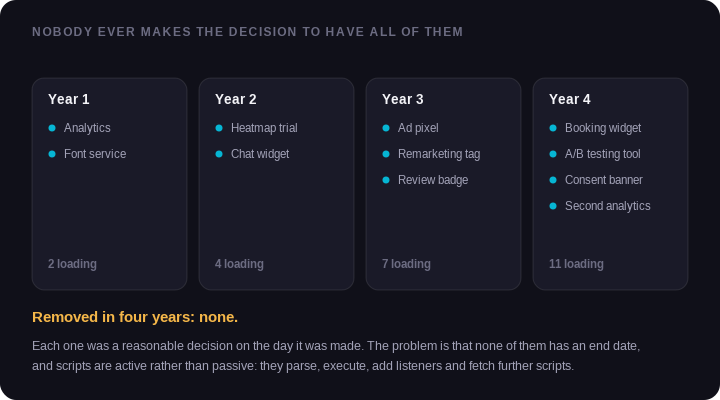
The compounding matters more than the total weight, because of what these scripts do. Images are heavy but passive: the browser downloads them and that is the end of it. Scripts are active. They parse, they execute, they add event listeners, they run timers, and several of them fetch further scripts of their own that were never in anyone's audit.
That is why third-party tags hurt INP in particular. Interaction to Next Paint fails when the main thread is busy at the moment someone taps, and a page running eleven scripts has a main thread that is busy far more often than a page running three.
How to run a script audit in twenty minutes
You do not need a specialist tool. You need the browser you already have.
- Open your busiest page in Chrome, in an incognito window so extensions do not pollute the result.
- Open DevTools and go to the Network tab. Tick Disable cache. Reload.
- Filter to JS. Sort by size.
- Write down every row whose domain is not yours. That list is your third-party surface.
- Switch to the Performance tab, record a reload, and look at the main-thread track. The wide blocks are what delays your interactions.
Two extra sources are worth ten minutes each. Your tag manager container will list tags that fire on every page, including ones whose original owner has left. And PageSpeed Insights has a "Reduce the impact of third-party code" section that names domains and the main-thread time each one costs, which is useful evidence when you need to argue for removing something.
Audit a product, service or blog page rather than the homepage. Homepages are often the most carefully optimised page on a site and the least representative of where your traffic lands.
The usual offenders, roughly ranked
Costs vary enormously by vendor, plan and configuration, so treat the ordering below as what we typically find rather than as fixed figures. The point is the shape, not the decimal.
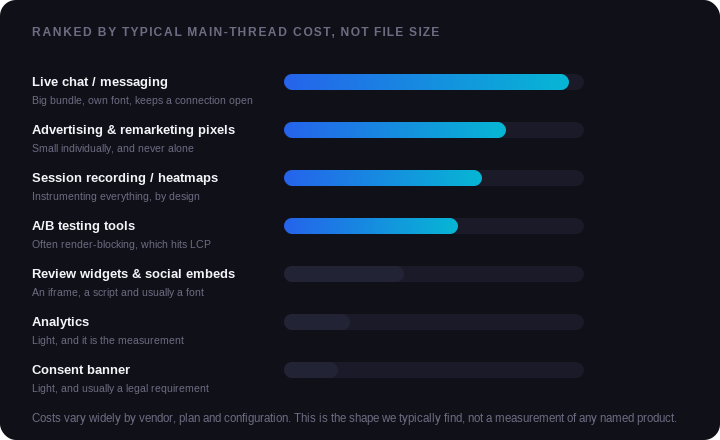
Live chat and messaging widgets are consistently the most expensive thing on a small-business page. They load a substantial bundle, often pull a font and an icon set, and keep a connection open. Many businesses run one that receives a handful of messages a month.
Advertising and remarketing pixels are individually small but rarely alone, and they frequently chain to further requests. These are the ones most often left behind after a campaign ends.
Session recording and heatmap tools are heavy by design, because they are instrumenting everything the user does. They earn their place during a redesign. They are hard to justify running permanently.
A/B testing tools carry a particular penalty: many are deliberately render-blocking, because showing the original page before swapping it would cause a flash. That is a direct hit to LCP, accepted on purpose, and it should not outlive the test.
Review widgets and social embeds are usually an iframe plus a script, and often a font. A static badge linking to the review profile achieves nearly the same trust signal for almost nothing.
Analytics and consent banners are generally the lightest of the group and the hardest to remove, since one is the measurement and the other is a legal requirement. These are usually the ones to leave alone.
Delete, defer or self-host
Every script on your list gets one of three decisions. Work down the list and be decisive; "maybe later" is how the list got this long.
Delete
The default, and the only option that reliably helps. A script is a candidate if nobody can name who reads its output, if it belongs to a tool you no longer pay for, if it supports a campaign that ended, or if it duplicates something else you run.
The test that settles most arguments: who looked at this data in the last ninety days, and what did they change because of it? If there is no answer, the script is costing you money and returning nothing.
Defer
For scripts you genuinely need but that do not need to run during the first render. A chat widget that loads after the page is interactive — or only when someone scrolls, or clicks a lightweight button you render yourself — keeps the function and removes most of the cost.
Loading tags through a tag manager on a delayed trigger rather than firing on page view achieves the same for most marketing tags. Be careful with anything your consent flow depends on, and with anything measuring page views, where deferring can under-count.
Self-host
For a small number of cases where the file is static and the third party is adding latency rather than function. Fonts are the clearest example: serving them from your own domain removes a DNS lookup and a connection to another server.
This is the narrowest of the three options. Anything the vendor updates — a tracker, a widget, anything with a privacy or security surface — should stay where it is, because self-hosting it means you now own its updates.
The rule that stops it happening again
A clean-up is worth doing. It is also worth nothing in two years if the process that produced the mess is unchanged — and in most organisations the process is that anyone can add a tag and nobody owns removing one.
One rule covers it. Every script gets a named owner and a review date when it is added. That is the whole policy, and it works because it makes the default removal rather than permanence.
Three habits make it stick:
- Keep a one-page list: script, what it does, who reads the output, when it is next reviewed. A spreadsheet is fine.
- Anything added for a campaign or a test gets an end date on the day it goes in, not afterwards.
- Re-run the twenty-minute audit once a quarter. Put it in the same recurring slot as whoever checks Search Console.
If you run monitoring, a new third-party domain appearing is exactly the kind of material change worth an alert — it is usually the first sign that someone added a tag without telling anyone.
Where to start
Do the audit on your busiest landing page this week. Expect to find between six and fifteen third-party scripts, and expect at least two to be things nobody can account for.
Remove those two first. They are free wins with no trade-off to weigh, and removing them tends to make the rest of the conversation easier, because the list stops looking untouchable.
Then take the heaviest script that is still earning its place and move it to a deferred load. That one change is frequently worth more than every image optimisation on the page.
Re-measure after four weeks rather than the next day. Field data runs on a rolling 28-day window, so an improvement made today is averaged against four weeks of the old behaviour before it shows up properly.
Someone to do the audit and the fix
The Core Web Vitals Fix is from $450 one-time and includes exactly this work: profiling to find what is really costing you LCP and INP, a prioritised plan, implementation, and re-measurement with a before-and-after report. Technical SEO Monitoring is from $79 a month, with weekly crawls and alerts when something material changes — which is how you find out a new tag was added before the score drops.
See Core Web Vitals Fix See Technical SEO Monitoring