An article you published two years ago is still bringing a trickle of traffic. It used to bring more. Nothing about it is wrong, exactly, but it mentions a tool that no longer exists and a figure from a tax year that has passed.
That page is worth more than a new one. It already has links pointing at it, a history with Google, and a position it only has to improve rather than earn from nothing. A refresh typically costs a fraction of a new article and moves faster, because the hard part, getting indexed and trusted, is already done.
The risk is doing it in a way that throws that away.
Which pages to refresh first
Not the oldest ones, and not the ones you happen to dislike. Open Search Console, go to Performance › Search results, set the range to the last six months and compare it with the previous six. Then sort by page.
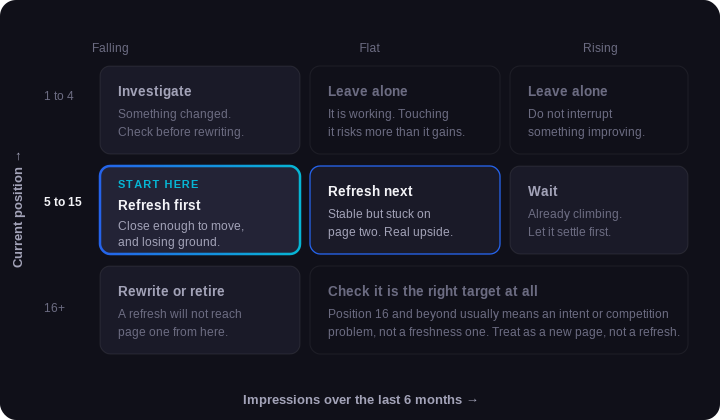
Positions five to fifteen are where refreshes pay. The page has already proved it can rank for the query. Moving from eleven to six can multiply its clicks, because almost all clicks happen on the first screen. By contrast, improving a page from position two to position one is hard and the gain is smaller.
Falling impressions matter more than falling clicks. Impressions tell you Google is showing the page less often, which usually means competitors published something better or the results page itself changed shape. Clicks can fall for reasons that have nothing to do with the page, such as an AI summary or a new feature taking space above it.
If a page in positions one to four has dropped suddenly, do not refresh it yet. Find out what happened first. A technical problem, a lost link or a change in what the query means will not be fixed by rewriting the opening paragraph, and you may make it worse.
What to change, and what never to touch
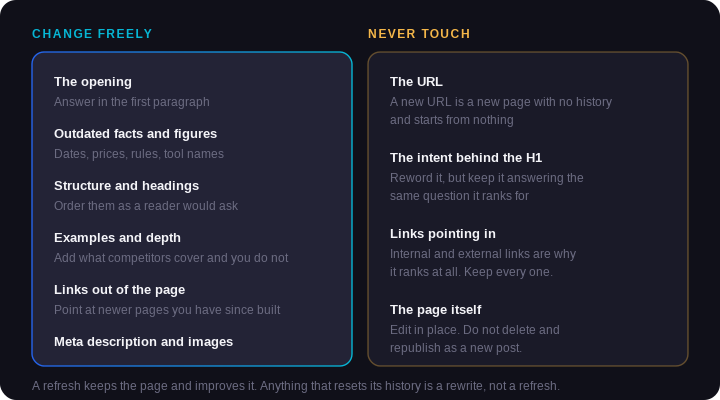
A refresh improves the page while keeping everything that gives it value. The distinction is not subtle, and getting it wrong is how people "refresh" a page into a 70% traffic loss.
Change freely
- The opening. Most old articles bury the answer. Put it in the first paragraph and the page competes better immediately.
- Outdated specifics. Dates, prices, rules, tool names, screenshots. This is the single most common reason a page stops performing.
- Structure. Reorder the headings so they follow the questions a reader actually asks, which you can read straight out of the query list for that page.
- Depth. Add the sections competitors cover and you do not. This is where most of the gain comes from.
- Links out. Point at the pages you have published since. An old article usually links to nothing you have written in two years.
Never touch
- The URL. A new URL is a new page, with none of the history. If you absolutely must change it, redirect the old one permanently, but the honest advice is: do not.
- The intent behind the heading. Reword it, sharpen it, add the year. Do not turn a page about how something works into a page selling a service. It will lose the query it ranks for and probably not win the new one.
- Links pointing in. Internal and external links are why the page ranks. Keep every internal link that points at it, and do not quietly drop the page from your navigation while you are tidying.
- The page itself. Edit in place. Deleting the post and publishing a new one is the single most expensive mistake available here.
The republish date question
This is where most advice becomes superstition. Two claims circulate: that changing the date gives a freshness boost, and that changing it resets the page's authority. Neither is right.
What is true is simpler. Google works out how substantially a page changed, and it does not take your word for it. Updating a date stamp while changing two sentences does not make a page fresh; it makes the date inaccurate. Rewriting half the article genuinely does make it new, and that will be noticed whatever the byline says.
So the rule is honesty, and it happens to be the rule that also works:
- Substantial changes (new sections, corrected facts, restructured answer): update the displayed date, and say what changed if your template allows it. "Updated November 2026: new figures for the current tax year" is useful to a reader and accurate.
- Minor edits (a typo, one new link): leave the date alone.
- Either way, keep the original publication date visible somewhere if the page has credibility from being early to a subject.
A changed date does not reset anything. The page keeps its URL, its links and its history, which is precisely why the URL rule above matters more than the date question people worry about instead.
The refresh itself, in order
- Record the baseline. Export the last 28 days for that page from Search Console: clicks, impressions, average position, and the queries it appears for. You cannot claim an improvement you did not measure first.
- Read the queries. The query list tells you what people actually expect from this page, including questions it does not currently answer. That list is your edit plan.
- Read the pages beating you. Look at the three results above yours and note what they cover that you do not, and what they do worse.
- Edit in place. Fix the opening, correct the facts, add the missing sections, re-link to newer pages, refresh the meta description.
- Update the date honestly, and note what changed.
- Request indexing in Search Console so the change is picked up sooner, then leave it alone.
The measurement window
Refreshes are judged too early, almost universally. A page needs to be recrawled, reassessed and allowed to settle, and the first fortnight is noise.
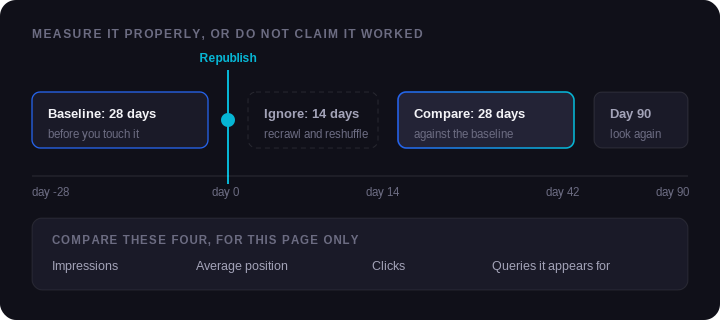
Compare the same four numbers you recorded at the start, for that page only, not for the site. And watch for a pattern that looks like failure but is not: impressions up, average position up, clicks flat. That usually means the page is now appearing for more queries, lower down, and the clicks follow later.
One caution about timing. If your business is seasonal, a 28-day window either side of a refresh can compare August with October and tell you nothing. Compare year on year instead, or wait for a quieter period to do the work.
What a refresh actually involves
Take a plumbing firm's article on boiler servicing costs, published three years ago. It sat at position four for a year and now sits at eleven, with impressions down by roughly a third.
The baseline export shows it still appears for forty queries, but the list has changed: half of them now include a year, and several ask about landlord certificates, which the article never mentions. The three pages ranking above it all state a price range in the opening lines. The old article reaches its figures in paragraph seven, and those figures are three years out of date.
So the refresh writes itself. Put the current price range in the first two sentences. Correct every figure. Add a section on landlord certificates, because the queries say people expect it there. Reorder the headings to match the order the questions are asked. Link to the service page, which did not exist when the article was written. Update the date and note that the figures are current for this year.
What does not change: the URL, the subject, and the four internal links pointing at it from elsewhere on the site. The work takes an afternoon, and it is competing against pages that cost far more to produce.
How often, and when to stop
Review your top twenty pages twice a year. Refresh the handful that have slipped. Most pages do not need annual attention, and refreshing a page that is performing well is a way of introducing risk for no reason.
If a page has been refreshed twice and still sits outside the top ten, stop refreshing it. At that point the problem is not freshness: it is the target, the intent, or the authority behind the site. Those need a different answer, and continuing to rewrite is the expensive way to avoid admitting it.
Refreshes, done without the risk
Content rewriting starts from $60 per page: we identify what is actually wrong with the page, rewrite it in place, keep the URL and the links, and tell you what changed. Keyword watch tracks your pages monthly, so a slip from position four to eleven is something you hear about while it is still cheap to fix.
See Content Rewriting See Keyword Watch