Most keyword research advice is written for people with a budget. It opens by telling you to put a competitor's domain into an expensive tool, and by step three you are looking at a spreadsheet of forty thousand phrases with no idea which of them matter.
A small business does not need that. You need perhaps twenty searches that genuinely bring buyers, grouped into a handful of pages you can actually write. The process below gets you there in seven steps, and each one works with free tools.
One thing to settle first. Keyword research is not about finding the biggest numbers. It is about finding the searches made by people who could become customers. If you have ever had traffic without enquiries, you have seen what happens when research chases volume instead.
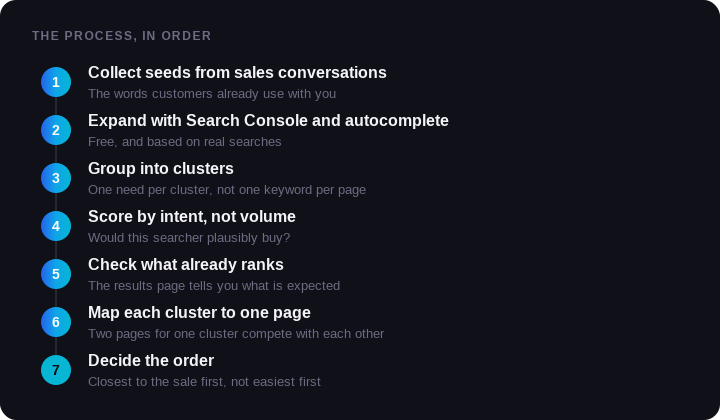
Start with your sales conversations
Before you open any tool, write down the words customers already use when they describe their problem to you. Not your words for it, theirs.
Go through the last twenty enquiries you received, by email, phone or form, and note the phrase each person used. A bookkeeper will find that nobody wrote "financial reconciliation services". They wrote "my books are a mess" and "I need someone to sort out my VAT". Those are the seeds, and they are better than anything a tool will hand you, because they come from people who actually got in touch.
Add the questions you answer repeatedly on calls, the objections you hear before someone buys, and the words customers use for your competitors. Twenty to thirty seeds is plenty. This step costs nothing and takes about an hour, and skipping it is the most common reason research goes wrong.
Expand the list with Search Console and autocomplete
Now widen the list, using sources that report real searches rather than guesses.
Search Console is the most valuable and the most overlooked. Open Performance › Search results, set the range to the last twelve months, and read the Queries tab. These are searches your site has already appeared for. Look especially at queries where you rank between positions eight and twenty: you are close enough that Google already considers you relevant, and a better page could move you onto the first screen.
Autocomplete is the fastest free expansion there is. Type a seed into Google and read the suggestions without pressing enter. Then try it with a letter after it, "bookkeeper for a", "bookkeeper for b", and so on. Each suggestion is a phrase real people type often enough for Google to predict it.
People Also Ask and the related searches at the foot of the results page do the same job for questions. Open one and more appear.
Search Console, Google autocomplete and People Also Ask cover this step completely and cost nothing. Two more worth adding: Google Trends, which shows whether a term is rising or fading and is good for seasonal businesses, and Bing Webmaster Tools, which includes a keyword research feature with actual numbers, free, for any verified site.
Google's own Keyword Planner is free but shows volumes as wide ranges unless you are running ads, so treat its figures as rough bands rather than numbers.
Group the list into clusters
You now have a few hundred phrases. Most of them are the same handful of needs, worded differently.
"Bookkeeper for small business", "small business bookkeeping services", "hire a bookkeeper near me" and "bookkeeping help for sole traders" are four ways of asking one question. They belong together, and they belong on one page.
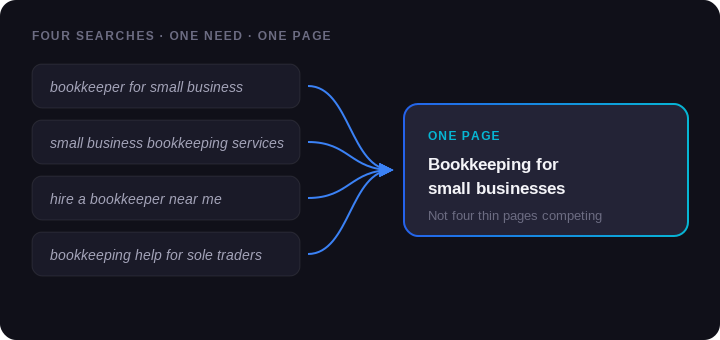
This matters more than it looks. The old habit of building one page per keyword produces four thin pages that compete with each other, split whatever authority you have, and leave Google to choose between them. One substantial page that answers the need properly beats all four.
Sort them in a spreadsheet by hand. For a list this size it takes an afternoon and you will understand your own market better at the end of it, which no tool gives you.
Score by intent, not by volume
Here is where most research goes wrong, and it is worth being blunt about it: search volume is the least useful number on the page.
A phrase searched two hundred times a month by people comparing suppliers is worth more to a small business than one searched twenty thousand times by people writing essays. Volume tells you how many people type something. It tells you nothing about whether any of them would buy.
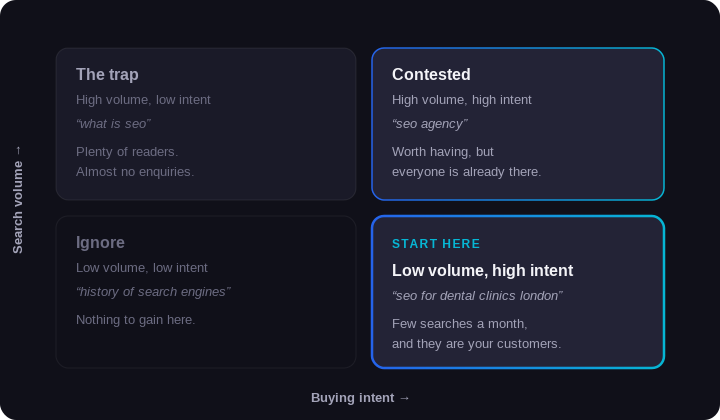
Score each cluster out of five on one question: would someone searching this plausibly become a customer within the next month? A search naming your service and a place scores five. A search comparing options scores four. A search asking what something costs scores four. A search asking what something is scores one.
Then add a second score, also out of five, for how well you can answer it. A question you handle every week, where you have specific experience and examples, scores high. A topic you would be writing about generically scores low.
Rank by the two scores added together. Volume becomes a tiebreaker, not the sort order.
Check what already ranks
Before committing to a cluster, search it yourself in a private browsing window and read the first page of results properly.
You are looking for two things. First, what kind of page Google is rewarding. If the whole first page is comparison articles and you were planning a service page, you have misread the intent, and the reverse is just as common. The results page is Google telling you what it believes the searcher wants.
Second, whether there is room. If the first page is ten national brands and two directories, a new small business page is unlikely to break in soon. If it is a mix of small firms, forum threads and one outdated article from 2019, there is room.
Note anything that takes up space before the normal results: a map pack means local signals matter more than content here, and a featured snippet or an AI summary means fewer people will click through at all. Both change whether a cluster is worth the effort.
This step needs no tool, just a private window so your own history does not colour the results. If you serve one area, add that place name to the search, since results vary by location.
Map each cluster to one page
Write the plan down, one row per cluster, with four columns: the cluster name, the page that will answer it, whether that page already exists, and the one sentence the page must deliver.
Two rules keep this honest. One cluster, one page. If two rows point at the same page, merge the clusters or split the page. One page, one job. A page trying to serve both "what is bookkeeping" and "hire a bookkeeper" will do neither well, because those readers want different things.
Decide for each row whether you are writing something new or improving a page you already have. Improving is usually faster and works better, particularly for those positions eight to twenty from step two, where Google already knows the page exists.
Decide the order
You cannot build twenty pages at once. Order them by how close the searcher is to buying, not by how easy the page is to write.
- First: the pages that name your service and a market or location. Few searches, high intent, and the ones you are most qualified to win.
- Next: cost, comparison and "best X for Y" pages. People at this stage are actively choosing a supplier.
- Then: the questions buyers ask just before committing, which are usually about process, timescales or risk.
- Last, if at all: broad explanatory topics. They bring traffic that mostly will not convert, and they are the hardest to rank for.
Build in that order and the early pages pay for the later ones.
The same process, in one example
Take a two-person bookkeeping firm in Leeds that works mainly with trades and small retailers.
Step one gives seeds straight from their inbox: "sort out my VAT", "behind on my books", "bookkeeper for a builder", "Xero help". Step two turns those into a few hundred variations, and Search Console shows the site already appears at position twelve for "bookkeeper for tradesmen" without ever having targeted it.
Step three collapses the list to nine clusters. One of them is construction bookkeeping, gathering "bookkeeper for builders", "CIS returns help" and "construction bookkeeping services".
Step four scores that cluster five for intent, because nobody searches it idly, and five for ability, because two thirds of their clients are already in the trade. Meanwhile "what is bookkeeping", with far more searches, scores one and two, and drops to the bottom.
Step five shows the first page is two national franchises and four small local firms, with no map pack. Room, in other words.
Step six maps the cluster to one new page: bookkeeping and CIS returns for construction businesses. Step seven puts it first, ahead of the broader pages, because it is the closest to a paying client.
Nine clusters, four pages worth building this quarter, and the broad explainer everyone else writes left firmly at the bottom of the list.
What to do after the research
Keyword research is not a one-off exercise. Rankings move, competitors publish, and the words people use change. Check Search Console monthly and watch for two things: queries you are newly appearing for, which are clusters you did not plan and may be worth a page, and queries where you have slipped, which usually means someone published something better.
Reread your own list every six months with fresh eyes. The seeds from step one will have changed, because the questions customers ask you change as your business does.
If you would rather not do this yourself
Keyword research and competitor analysis runs this whole process for you and hands back the cluster map, the intent scores and the build order, with the competitor picture alongside it. Keyword watch then tracks the clusters each month, so you see movement while there is still time to act on it.
See Keyword Research See Keyword Watch