Search intent is what the person actually wants when they type a query. Not the words themselves, but the outcome they are after: to learn something, to reach a particular site, to compare their options, or to get something done.
It matters because Google ranks pages by whether they satisfy that want. A brilliant service page will not rank for a question people ask in order to learn, no matter how well written it is, because it answers the wrong kind of need. Matching intent is not an optimisation you add at the end. It decides what the page has to be.
There are four types. Here they are side by side, then one at a time.
| Type | What they want | Example query | Page that wins | Length | Call to action |
|---|---|---|---|---|---|
| Informational | To learn or understand | how to fix a leaking tap | Guide or how-to article | 1,200 to 2,000 words | Read something related |
| Navigational | To reach a specific place | hl digital pricing | The page itself, loading fast | As short as it can be | The thing they came for |
| Commercial | To compare before choosing | best bookkeeping software for freelancers | Comparison or review | 800 to 1,500 words | Book a call, see pricing |
| Transactional | To act now | emergency plumber near me | Service or product page | 400 to 800 words | Call, buy, enquire |
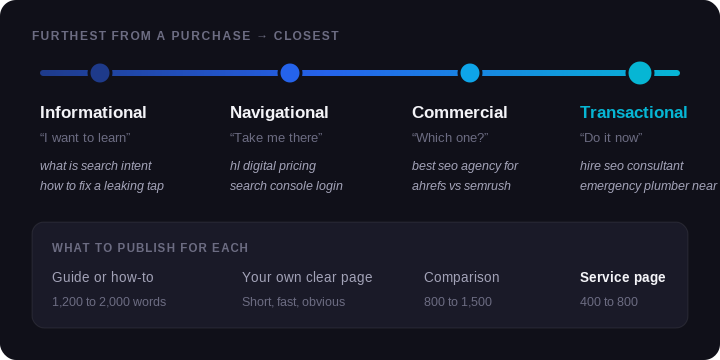
Informational: “I want to learn”
Someone wants an answer or an explanation. They are not buying today, and in many cases they are not buying at all.
Typical queries: what is search intent, how to fix a leaking tap, why is my boiler losing pressure. Question words are the giveaway, though plenty of informational searches have none.
What the results page looks like
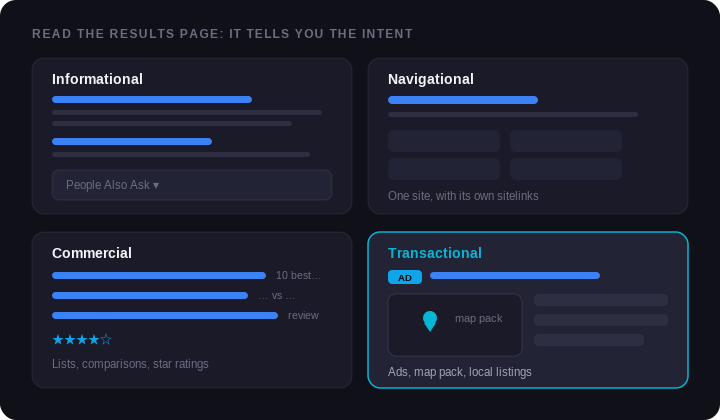
Long-form articles, a People Also Ask block, often a featured snippet lifted from one of them, and sometimes a video. Few ads, because advertisers know these people are not ready to spend.
What to write
A guide or how-to that genuinely answers the question, early and directly, before any preamble about your company. Aim for 1,200 to 2,000 words, structured with clear subheadings so the answer is skimmable. Keep the call to action soft: another article, a checklist, a newsletter. Asking for a sale here will lose the reader.
Navigational: “Take me there”
Someone already knows where they want to go and is using search instead of typing the address.
Typical queries: hl digital pricing, search console login, [brand] contact. A brand name is almost always present.
What the results page looks like
One dominant result, the official site, usually with sitelinks underneath. Everything below it gets very few clicks.
What to write
For your own brand, make sure the page exists, loads fast and is obviously the right one. Keep it short. The call to action is simply the thing they came for, and not having a page for a term people search alongside your name is a quiet, common loss.
For someone else's brand, leave it alone. Trying to rank for a competitor's name rarely works and reads badly when it does.
Commercial: “Which one should I choose?”
Someone has decided they need something and is working out what to buy or who to hire. This is the stage most businesses under-serve.
Typical queries: best bookkeeping software for freelancers, ahrefs vs semrush, how much does seo cost, [service] reviews. Look for best, vs, top, alternatives, cost and review.
What the results page looks like
Listicles and comparison pages, review sites, star ratings in the results, and far more ads than on an informational search.
What to write
A comparison, a pricing explainer or an honest alternatives page, 800 to 1,500 words. Be specific about who each option suits and who it does not: a page that says every option is excellent helps nobody and is transparently promotional. Saying plainly when a competitor is the better fit for a particular case earns more trust than it costs you. The call to action can be direct here, because they are choosing.
Transactional: “I want to do it now”
Someone is ready to act. These searches are the smallest group by volume and the most valuable by a distance.
Typical queries: emergency plumber near me, hire seo consultant, buy standing desk, bookkeeper leeds. A service plus a place is the classic shape.
What the results page looks like
Ads at the top, a map pack if the service is local, then service or product pages. Articles rarely appear, and when they do they rank poorly.
What to write
A service or product page, 400 to 800 words, that states what you do, who it is for, what it costs or how pricing works, and how to get started. Put the call to action near the top as well as the bottom. Nobody at this stage wants your company history first.
The words that give the intent away
Most queries announce themselves. These cues are not rules, but they are right often enough to sort a long list quickly before you check anything by hand.
- Informational: how, why, what, guide, tutorial, examples, ideas, meaning, and anything phrased as a question.
- Navigational: a brand name, plus login, contact, pricing, careers, support or a product name.
- Commercial: best, top, vs, versus, alternatives, review, comparison, cheapest, cost, how much, and "for" phrases such as crm for small teams.
- Transactional: buy, hire, book, order, near me, quote, free trial, and a service paired with a place name.
Two cautions. "How much does X cost" looks informational because it starts with how, but the person is comparing suppliers, so treat it as commercial. And "near me" no longer has to appear for a search to be local: Google infers location from the device, so emergency plumber behaves like emergency plumber near me in most cases.
Use the cues to make a first pass, then verify the dozen terms that matter most by searching them. Cues sort a list; the results page settles it.
What an intent mismatch looks like
A mismatch is when the page type and the intent disagree. It is the most common reason a well-written page never ranks.
- A service page aimed at an informational query. It ranks nowhere, because every result on page one is a guide.
- A blog post aimed at a transactional query. It may rank briefly, but visitors want to hire someone and the page gives them an article.
- One page chasing two intents. "What is bookkeeping and why choose us" serves neither reader and usually loses to pages that pick one.
The check takes a minute. Search your target query in a private window and look at the first ten results. If they are a different kind of page from the one you are planning, change the plan, not the wording. The results page is Google showing you what it has already decided that searcher wants.
One more thing worth watching: intent can shift over time, and it varies by place. A term that used to return guides may now return product pages, which is a signal that buying behaviour has changed, so it is worth re-checking the terms that matter most to you once or twice a year.
How to use this
When you plan a page, write the intent down before the outline. One word, chosen from the four. Then let it decide the format, the length and the call to action, using the table above.
Do the same for the pages you already have. A page that has never performed is often a good page serving the wrong intent, and rewriting it as the right type is faster than starting again.
Want this done across your whole site?
Keyword research and competitor analysis labels every target search by intent and tells you which page type each one needs. Blog writing then produces the pages, written to match the intent rather than the keyword.
See Keyword Research See Blog Writing