You open analytics and the line is heading the right way. Sessions are flat or climbing, month after month. Then you open your inbox, and the enquiries tell a different story: the same handful as last year, or fewer.
It is a common and frustrating situation, because on the surface the website looks like it is working. But traffic was never the goal. Enquiries are. When the two drift apart, something between the search result and the contact form is broken, and it is almost always one of five things.
Each of the five has a check that confirms it or rules it out, and none of them needs a developer. Work through them in order. The first is by far the most common.
The pattern to look for first
In GA4, open Reports › Acquisition › Traffic acquisition, set the date range to the last twelve months and compare it with the previous period. Then look at your key events, which is what GA4 now calls conversions: form submissions, clicks on your phone number or email address, booking requests.
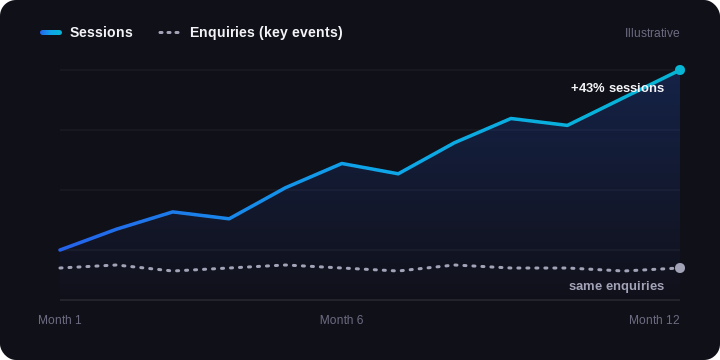
The pattern this article is about looks like this: sessions flat to rising, key events flat. If enquiries are falling along with traffic, you have a visibility problem, which is a different diagnosis. And if key events show zero across the board, check the tracking before anything else. A form that sends you an email but never fires an event looks exactly like a site that converts nobody.
Submit a test enquiry yourself and confirm it appears in Reports › Realtime within a minute or so. Once you trust the numbers, start with the first diagnosis.
You rank for the wrong intent
This is the most common cause by a distance. Your pages earn traffic from people who want to learn something, not from people who want to hire someone.
A plumbing firm whose most-visited page answers “why is my boiler pressure dropping” gets a steady stream of readers fixing it themselves. A consultancy whose article on “what is a marketing funnel” ranks well attracts students writing essays. The visitors are real. They were just never going to buy.
Searches fall broadly into four groups: informational (I want to learn), navigational (I want a particular site), commercial (I am comparing options) and transactional (I am ready to act). Enquiries come overwhelmingly from the last two. Informational content still has a place, but only when it leads the reader somewhere useful.
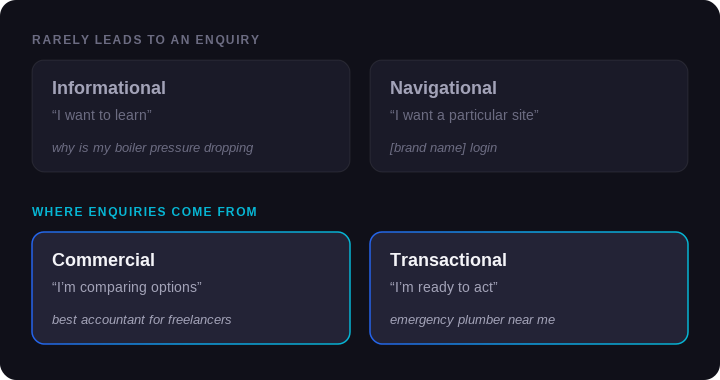
In Search Console, open Performance › Search results, choose the Queries tab and sort by clicks. Read the top 50 and label each one: would someone typing this plausibly hire you within the next month? Do the same on the Pages tab for your top landing pages. If most of your clicks land on queries you labelled “no”, you have found the main problem.
The fix is not more traffic. It is pages built around commercial and transactional searches, such as “[service] in [city]”, “[service] cost” or “[service] for [type of business]”. Finding those terms, and judging which of them competitors already own, is exactly what keyword research and competitor analysis is for.
The traffic is from the wrong market
Sometimes the intent is right but the visitor is in the wrong place. A Hong Kong accountancy firm that ranks in India, the United States and the Philippines for “small business accountant” will see healthy sessions and almost no enquiries, because none of those readers can use an accountant in another country.
The same applies to language, and to the type of buyer. A page written for enterprise procurement teams that ranks for freelancer searches will attract plenty of visitors and very few enquiries.
In Search Console, open the Countries tab on the Performance report. In GA4, go to Reports › User › User attributes › Demographic details and switch the table to Country. Compare where your visitors are with where your customers are.
If a large share of sessions comes from countries you cannot serve, your real traffic is smaller than the headline figure, and your conversion rate on the traffic that matters may be perfectly healthy. If your own market is under-represented, the work is local landing pages, hreflang tags where you serve several countries, and a Google Business Profile for each location you trade from.
The path to an enquiry is broken
Here the visitor is right and wants to get in touch, and the site makes it hard. The contact form fails silently on mobile. The submit button hides behind a cookie banner that never closes. A CAPTCHA rejects real people. The phone number is an image that cannot be tapped. The only call to action sits at the bottom of a very long page.
Every one of these costs enquiries without leaving a trace in your inbox, which is why they can go unnoticed for months.
Do it yourself, on a phone, on mobile data rather than office Wi-Fi. Search Google, land on one of your top three pages, find a way to contact you and send a real enquiry. Note everything that slows you down.
Then in GA4, open Reports › Engagement › Landing page and add a comparison by device category. If desktop visitors enquire at a reasonable rate and mobile visitors almost never do, the path is broken on mobile. If form interactions are switched on in enhanced measurement, compare form_start with form_submit: lots of starts and few submits means people are trying and failing.
The fix is usually small: a visible call to action near the top of every commercial page, a tappable phone number and email address, a form with as few fields as you can live with, and a clear confirmation so the visitor knows the message arrived.
Nothing tells the visitor to trust you
Someone who has never heard of you is about to hand over their name, their email address and a description of their problem. Before they do, they look for reasons to believe you are real and competent. If they find none, they go back to the search results and contact the next firm, which may be no better but looks more established.
The signals that tend to matter are concrete ones: a named business with a physical address, real people on the about page, specific examples of work, reviews that can be checked on a third-party platform, clear pricing or at least a price range, and an honest description of what happens after someone gets in touch. Stock photography, no address and copy that could describe any firm in your industry all push the other way.
Open your top landing page and ask the three questions a sceptical stranger would ask. Who exactly is behind this? Have they done this for someone like me? What happens if I get in touch? If the answers are not visible without hunting, add them.
In GA4, a landing page with a good engagement rate and no enquiries often points here: people read, think it over, and leave.
The pages are too slow
Slow pages lose visitors before they have read a word, and they lose more of them on mobile. A page that takes several seconds to show its main content, or that jumps around as images load just as someone reaches for a button, quietly costs enquiries even when everything else is right.
In Search Console, open Experience › Core Web Vitals and look at the mobile report. Any URLs marked “Poor” are your priority. Then run your top three landing pages through PageSpeed Insights and read the field data at the top, which reflects real visitors, rather than the lab score underneath.
The usual culprits are oversized images, too many third-party scripts such as chat widgets, trackers and embedded video, and heavy page builders. Speed is rarely the only reason enquiries are missing, but it makes every other problem on this list worse.
A 20-minute self-diagnosis in GA4 and Search Console
If you only have twenty minutes, run these checks in this order. Each one either rules a diagnosis out or points straight at it.
- Confirm tracking. 3 min
Submit a test enquiry and watch for it in GA4 Realtime. No event means you are diagnosing with broken data. Fix that before anything else. - Read your queries. 5 min
Search Console, Performance, Queries, sorted by clicks. Label the top 50 “would hire” or “would not”. Mostly “would not” points to diagnosis 1. - Check the countries. 2 min
Search Console, Countries tab. A large share from markets you do not serve points to diagnosis 2. - Compare devices. 4 min
GA4 Landing page report, compared by device category. Mobile enquiring far below desktop points to diagnosis 3. - Walk the path. 4 min
Phone, mobile data, search, land, enquire. Anything that slows you down is slowing your visitors down too. - Check Core Web Vitals. 2 min
Search Console, Experience, Core Web Vitals, mobile. URLs marked “Poor” point to diagnosis 5.
That leaves trust, which no report measures directly. If the other checks come back clean and enquiries are still flat, diagnosis 4 is very likely the answer.
Most sites have more than one of these going on, but one usually dominates, and fixing it moves the numbers more than tidying up everything else. Start with the check that comes back worst, fix that, and measure again in a month.
Want the data read for you?
Analytics and reporting sets up GA4 and Search Console properly and sends you a short written brief each month on what moved and why. If the queries check shows you are ranking for the wrong searches, keyword research and competitor analysis finds the ones that bring buyers.
See Analytics & Reporting See Keyword Research